The only Technology Blog you will EVER need!

Wireless Tv - No Power Cords, No Antenna & No Battery!

Posted by Pro Blogger Wednesday, January 13, 2010 0 comments

Wireless power has gone from lab prototype to working product in a little over 18 months, and Haier stuck MIT's WiTricity into a TV along with WHDI wireless video for complete wirelessness. Complete. Wireless. Ness.

Sure, there's a big power unit on the wall, radiating (totally harmless) RF into the back of the TV, which has a coil inside to receive the juice. It only delivers full strength if it's parallel, so you have to plan ahead and somehow setup the TV in front of the wall that has the power module. Because of all the hocus pocus, the TV itself is a chunkster, and that power transmitter is no slim jim either.
Still, the idea is a good one, and the promise—as both MIT and Intel work their asses off getting wireless power up to snuff—is real.
WHDI is a lot further along in development. Wireless HDMI isn't exactly household, but the tech is now supported by basically all of the biggest CE companies except Panasonic. I'm not going to buy this Haier TV—it might not even be for sale this year—but it's a concrete sign of what's to come.


It's only a proof of concept, but this is laptop with a clear OLED screen—but a stone's throw from those floating 3D displays of Avatar. Practical? Not necessarily. The future? OBVIOUSLY.
The resolution is less than a 1000 wide, and less than 600 tall on this 14 incher. It's pixely, but let's not quibble.
You see right through the 40% translucent screen, then something appears on the screen (like a white background), and you can't see through it anymore.
Are you processing this? No, you can't be. It's only 2010. Man wasn't prepared for this kind of technology yet. The brain hasn't evolved enough. We're primates. Squirrels. Slugs.
Maybe in 100 or 200 years, the great artists of the world will reflect on what's happened today and make some sort of sense of it all. Until then, we'll just keep on breathing, in, out. Until then, we'll weep.


Let's clarify two things right away: first, the Ideapad U1 hybrid notebook tablet is still in the very rough stages of development. Second, it's going to be awesome—if it can live up to its potential.
Let's review the concept quickly before we get into the details. The U1 is literally two separate devices, joined together and made to play nice. One is a multitouch tablet that runs Linux and has a speedily efficient Qualcomm ARM 1Ghz Snapdragon processor running the show. The other is a Windows 7 notebook with an Intel Core 2 Duo SU 4100 processor.
The build is like Lenovo's other IdeaPads, except for the translucent red top that houses the tablet. When the base and the slate are linked up, the latter acts as an 11.6-inch, 720p (1366x768) monitor that looked crisp despite being saddled with Intel's integrated graphics. The (non-chiclet) keyboard is based on the current lineup of IdeaPads, and both it and the touchpad worked smoothly. The U1 we saw wasn't set up to do much other than web browse, and pages loaded quickly. The notebook has built-in Wi-Fi, but can also run off of the tablet's 3G connection, which I can see being a pretty great benefit for times when wireless isn't readily accessible.

The fun part, though, is unclasping the tablet from its shell. It's firmly latched in, which is more reassuring than frustrating. Once removed from the notebook, there's a two or three second lag before the Snapdragon processor kicks in. It's not seamless, but it's close enough. Tablet mode greets you with a six-panel screen of apps similar to that of Lenovo's Skylight smartbook. The selection is limited for now, but Lenovo will be opening up the SDK to developers soon to give you more to play with than the standard YouTube, Gmail, and Facebook-type options.

You can also enter a type of content mode, which divides up your stored files between music, video, images, and documents. With the multitouch interface, you can quickly jump among all four, and adjust how much of the screen is devoted to each. The resistive screen was good, but not great—it at times took some pretty insistent pressing to get the response I was looking for. The viewing angles could also use work; unless you're looking nearly dead-on at the display, you're pretty much out of luck.
I was impressed by the sound quality—not excellent by any means, but better than I expected from a tablet device. One immediately obvious downside is the total absence of ports on the tablet other than the docking—there's not even a headphone jack. It's configured for Bluetooth, but I'd still like the option to plug in my buds. The tablet also currently lacks an accelerometer, so there's no way to orient documents or images based on its position. This is hopefully something that will be addressed before its release.
I said the two devices are totally separate, and I meant it. There are advantages and disadvantages to this set-up. On the plus side, while the tablet is undocked, you can hook the base up to a monitor and get full notebook functionality. If you remove it during web browsing, the tablet remembers which site you were on and places you there automatically (and vice versa). In fact, when I had Gizmodo in notebook mode and removed the slate, it automatically took me to the mobile version of Giz.
The down side is that right now, web pages are the only things that are transferable this way. If I were working on a document in notebook mode, there's no on-the-fly transition once I pop out the tablet. You can drag and drop, but a more seamless transfer would be helpful. It would also be nice to be able to control the tablet remotely with the base, but once they've separated there's no interaction between the two. Again, these are things that may or may not be addressed by the time the U1 comes out in the second half of this year.

About that release: it's up in the air right now as to when you can get your hands on one of these, because of all of the tweaks that need to be made. It will also be crucial for Lenovo to be able to build up a decent store of apps for the U1 and the Skylight if these are going to have any functionality beyond very basic web browsing and media playback. And for an estimated retail price of $999—minus whatever subsidy they're able to get from a partner carrier—that functionality had better be there.
All in all, the U1 is a slick device, if a little undercooked. If nothing else, I'm excited to see how far they can take this concept once they put it in production. But no rush, Lenovo. If you take the time get it right, it'll be something special.


I just got a chance to play with the big-screened, touchscreened Skiff Reader, which is targeted at periodicals. It's incredibly thin, incredibly light, and they've even got a color screen prototype—Kindle and Nook should be scared.
I should add first that this is not a final version—they haven't announced pricing or availability yet—but it feels very finished and I suspect any delay in getting the Skiff to market will be due to the store not being quite ready. The color version is the exact same form factor, and while it's pretty deep in the prototype stage, it was impressive. Color was minimally pixelated and pretty clear, if obviously nowhere near as sharp as an LCD (or paper, for that matter). I don't have any info on its release date or price, unfortunately.
Once you hold it, you're struck by how thin and light it is. Just a hair over 0.25 inches thick, it's also super light and feels good in the hand—it's solid despite it's airy heft. The screen feels huge compared to the Kindle or Nook, because it is—its 11.5-inch touchscreen is huge, significantly bigger than even the Kindle DX (at 9.7 inches). The size is actually a little awkward for reading books (it's wider and taller than even a big hardcover book) but it's excellent for newspapers. The touchscreen works well, responding to both taps and swipes easily, and the refresh rate is pretty good (meaning, it's still e-ink, but it's not slower than existing readers). It can also handle 12fps animation, which is pretty primitive compared to LCD but just fine for little ads or whatever.

The layout is where it really shines—it feels more like a newspaper than any other reader I've tried. The layouts are designed by the periodicals themselves, so instead of looking like a bare PDF of text, it feels like there's thought put into the design. To navigate through a newspaper, you can navigate to a section with the "scrubber bar," a scroll bar on the bottom of the screen that displays each consecutive section's name as you swipe through it. It's great; you can go right to the arts section, sports section, whatever, and it feels totally natural. You can also swipe on each article to go to the next page, or swipe up and down to change font size. Highlighting and annotating both work well, and Skiff plans to automatically upload your highlights and notes to the cloud for access later.
Magazines don't fare as well as newspapers; it feels like nobody really knows how to digitize magazines. On the Skiff, magazine reading is pretty awkward—you flip through full page scans, then tap a page to zoom in, at which point you have to slowly and uncomfortably pan through the zoomed page, with the e-ink refreshing every time you move. It's not a good solution, but like I said, this isn't a final release and hopefully they'll have worked it out by then.
Books look fine, although clearly the Skiff is designed for newspapers; there's about an inch of blank space on all sides when you read a book, because 11.5 inches of text is a lot to stare at. Other than that slightly unfulfilled feeling when you see unused space, book-reading should be no problem.
The other problem I see is the store. The Kindle and Nook but waltzed into this world with massive and well-known stores behind them, and the Skiff is creating one from scratch. They've got a lot of publishers behind them, but the store right now is pretty bare. Of course, since it's not out yet, this may all be a moot point—but I wonder if their scrappy little store can compete with Amazon and Barnes & Noble.

Source: Gizmodo.com

With perennial foe Pakistan always teetering on the brink of political collapse and neighboring superpower China taking strides into space technology, India has announced that it is developing an exo-atmospheric "kill vehicle" that will knock enemy satellites out of orbit.
The program was proudly announced as part of India's ballistic missile defense program, a division of India's Ministry of Defense. However, in a briefing last week defense officials admitted lots of work on the project is yet to be done. Like, almost all of it. The kill vehicle (read: missile of some kind) will be guided by a laser, which will lock onto the offending satellite and keep the kill vehicle on a solid interception course. Neither the laser nor the kill vehicle actually exists yet, but be forewarned: India will put a dent in your space capabilities at a time and place as yet undetermined.
Of course, India isn't the first state to dabble in space-based defenses or satellite-slaying technologies. Ronald Reagan's Strategic Defense Initiative — the now infamous "Star Wars" — proposed to arm a series of ground- and space-based stations with interceptor missiles (for defensive purposes only, of course). In 2007 China brazenly launched a ground-based missile into the atmosphere to demonstrate its ability to destroy satellites, creating a mess of orbital debris when it blew apart an aging weather satellite. The U.S. also used a ship-based missile to incinerate one of its own spy satellites in 2008, as its decaying orbit was threatening to send it crashing down to Earth with toxic materials on board.
So exactly whose satellites might India be protecting herself from? Pakistan, India's most reliable nemesis, isn't exactly running a robust space program. More likely the world's largest democracy is a bit wary of the world's largest military-minded single-party ruled "republic" right across the Himalayan range. Whatever the reasoning, putting weapons in space has never been a popular topic in the international community; we likely haven't heard the last word on this.

Source: Space

Lenovo Lephone - another competitor for Google Nexus One

Posted by Pro Blogger Tuesday, January 12, 2010 0 comments

When I saw the Lenovo's Android-based 3.7-inch touchscreen Lephone last week I was all smleh'ed. "Yet another touchscreen Android", I thought. Now, looking at the shiny marketing shots, I want to lick it, pant it, and rub it all day.

It seems to me that, it has more personality than the Nexus One superphone. I like how the keyboard attachment looks too, although I don't see myself using it. No announcement about its potential worldwide introduction yet. For now, it's China only.


Source Slashgear.com

Price in Pakistan: Rs.35,000

We have to admit to a major sin – despite the fact that our team consists of revered cell phone professionals, none of us happens to be a sworn business user that wakes up to the ringing of the Wall street´s opening bell, spends hours following Dow Jones and intently watches Bloomberg before going to bed. Still, we aren’t blind, spot the tools that modern business people are armed with and appreciate the proper ones. One of the devices that really impressed us last year was the Nokia E71 and the handset has earned its place in our gift guide for 2009 in the best business-oriented cell phones category. What we have in our hands now is the successor to this particular business tool, namely the Nokia E72. In reality, it retains everything we loved about the E71 and adds several improvements like 5-megapixel camera, 600MHz processor (the E71 is equipped with a 369Hz one), twice the amount of ROM (512MB), accelerometer and 3.5mm jack.

Its design and proper build quality are not just equally great, but even improved on. The handset comes boxed with a leather case that makes carrying around the device safer, because it does protect it from getting scratched. Aside from it, the box contains a charger, headset, USB cable, hand strap and user guide.

Nokia E72Nokia E72

One of the qualities of the Nokia E72 that we like best is its dainty design. This is truly appealing business-oriented cell phone that comes with compact size, but emanates reliability.

Nokia E72Nokia E72Nokia E72
One of the qualities of the Nokia E72 is its dainty design

Nokia E72

You can compare the Nokia E72 with many other phones using our Size Visualization Tool.

Its display measures 2.4-inches, has QVGA resolution and remains totally useable in direct sunlight, even though the image quality gets rather bad in this case.

One of the minor design differences to the Nokia E71 is the integrated optical pad. It features great sensitivity (can be set) and is a fully functional replacement of the standard D-Pad. Still, if you don’t like this particular way of controlling the handset, you can easily turn it off.

Nokia E72Nokia E72Nokia E72
The Nokia E72 retains the excellent keyboard of the E71

The Nokia E72 retains the excellent keyboard of the E71 and we even think the buttons are actually easier to press. They have pronounced, pleasing travel, but unfortunately, their rather small size means you will have to use your fingertips, which in turn disallows faster text entry. The manufacturer has added shortcuts to activate the Bluetooth, silent mode and use the camera flash as flashlight. We do like the altered design of the functional keys and the send and end keys, it makes them easier to use and they look as if made of polished metal.

Source: PhoneArena.com

Transparent Phone - Something we all wish we had!

Posted by Pro Blogger Monday, January 11, 2010 6 comments

Window Phone - concept phone On one hand, clear conceptual phones already, so this is not just the first, but on the other, the so-called Window Phone has one impressive feature - its transparent housing varies depending on the weather! Thus, in the sunny days, the screen will be completely transparent, on a rainy day it will appear «virtual» drop, but it is covered with frost frost. Ie translucent screen will look like as well as present a window into a variety of weather. I do not know how it will be practical, but at least, very original!


Here are its Images....


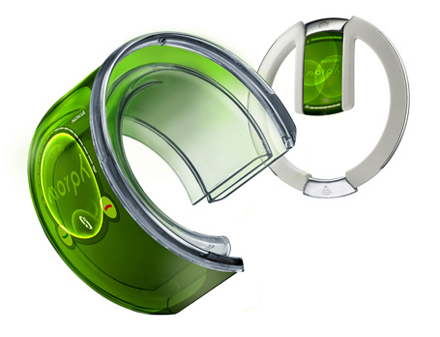
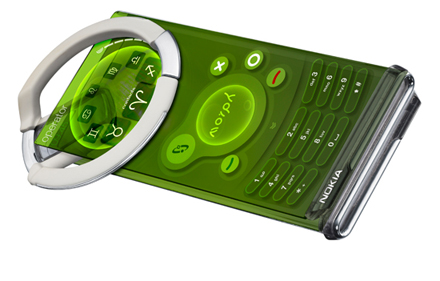
Take a step back from normal life just for 5 minutes and have a look at what Nokia and the University of Cambridge have been working on – Nokia Morph, nanotechnology for mobile phones.

Nokia Morph

This amazing new technology has limitless possibilities, not just within mobil ephones but technology in general especially when it comes to price and convenience.

Morph Nanotechnology

Dr. Tapani Ryhanen, Head of the NRC Cambridge UK laboratory, Nokia, commented: “We hope that this combination of art and science will showcase the potential of nanoscience to a wider audience. The research we are carrying out is fundamental to this as we seek a safe and controlled way to develop and use new materials.”

Professor Mark Welland, Head of the Department of Engineering’s Nanoscience Group at the University of Cambridge and University Director of Nokia-Cambridge collaboration added: “Developing the Morph concept with Nokia has provided us with a focus that is both artistically inspirational but, more importantly, sets the technology agenda for our joint nanoscience research that will stimulate our future work together.”

Just take 5 minutes to watch this video – exciting times ahead!


Source: Nokia Press

Smartwatch for BlackBerry

Posted by Pro Blogger Sunday, January 10, 2010 0 comments


We managed to track down the guys from Canada's Allerta and got to spend some time with a couple dummy models of the soon-to-be-released inPulse smartwatch for BlackBerry. Design-wise, it's very attractive, with a brushed metal body and a leather band. As a bonus to early orderers, the first 1,000 sold will be custom-milled on a CNC router -- ironically, it'll actually be more cost-effective for them to do it that way while they build up production volume. In terms of functionality, it will launch with support for displaying text messages, caller ID, new e-mails, and BlackBerry Messenger messages (yes, it supports BBM!). It'll give you information on who the message is from and a preview of the message's contents. We couldn't get a hard shipping date, but rest assured we'll let you know as soon as we do -- for now, our hands-on gallery will have to suffice.

Source: Engadget.com

AddThis

Share |

iCyberTech's Fan Box

iCyberTech on Facebook

Followers